
TD999 Login and Registration Guide
TD999 accepts one credential and one only: a Pakistani phone number. Here is how to register, the difference between password login and SMS code login, what the Google button actually does, and every reason a TD999 sign-in gets rejected with what fixes it.
- +92Phone numbers only
- 2Ways to sign in
- 0Documents at sign-up
- Rs 666+Invite banner on this screen
TD999 Is Phone-Number Only
The login screen says it plainly: “Only support Phone number Login”. There is no email option, no username option. The country code is fixed to +92 with a Pakistan flag, which tells you who the app is built for.
That single design decision drives almost everything else on this page, and it has one serious consequence worth understanding before you sign up: your account is your SIM. Lose the number and you lose the route back in. We come back to this below.
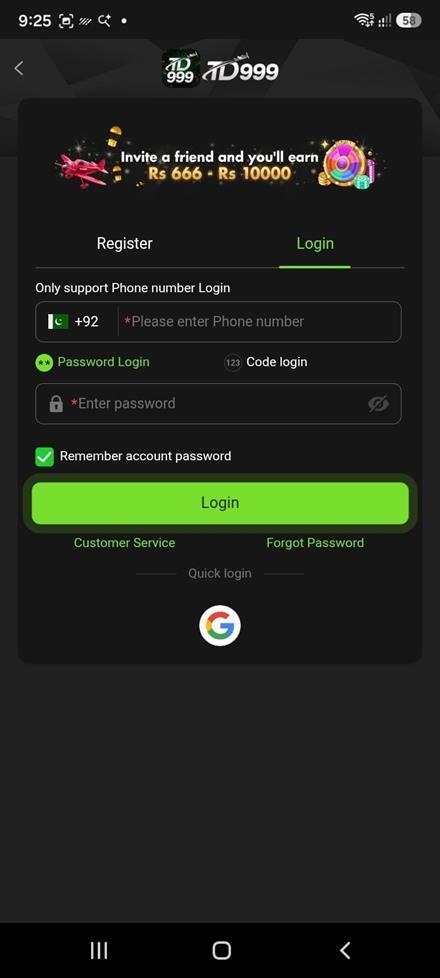
How to Register on TD999
- Open the app or the site and choose the Register tab rather than Login.
- Leave the code on +92 and enter your number without the leading zero — 3XX, not 03XX.
- Set a password you use on no other service. This account will hold money.
- Complete any verification the app asks for. SMS verification is required later for some promotions, so a working number matters.
- Open the home screen and check the Promo tab for what has been credited.
No identity document is requested at sign-up. No email, no address, no card. That makes registering fast — and it means the number you choose on day one is the only thing tying you to the account months later if a payout is ever queried.
If you were given an invite link, open the app through that link before registering. Referral attribution is set when the account is created and generally cannot be added afterwards. If the invite reward is part of why you are signing up, this is the only moment it can be got right — see the invite code guide.
Password Login or Code Login?
The screen offers both, as two toggles beneath the number field. They are not equivalent, and the difference shows up at the worst possible moment — when you want to withdraw.
| Method | Good for | Worth knowing |
|---|---|---|
| Password login | Signing in instantly, with no SMS | Works when the network is poor or messages are filtered. Needs a password you will not forget. |
| Code login | Nothing to remember | Every single sign-in depends on an SMS arriving at that moment. If delivery fails, you are locked out. |
| Google quick login | Speed | Convenience only — the account is still tied to the phone number. Keep that Google account reachable. |
Set a password even if you intend to use code login. It costs nothing and it is the difference between a bad signal day being an inconvenience and being a lockout. The screen also offers “Remember account password”, which is fine on your own device and a poor idea on a shared one.
The Risk Nobody Warns You About
Because TD999 supports only phone-number login, an account reachable only through a SIM you no longer own is an account you have effectively lost. Changing networks, losing a handset, or letting a number lapse can all cost you a balance — and in this category that is a more common way to lose money than any scam.
There is no email fallback to bind here, which is precisely why the practical advice is different from the sibling platforms:
- Register on a number you intend to keep, not a spare or a temporary SIM.
- Set a password immediately, so you are not dependent on SMS delivery.
- If you are changing networks, port the number rather than replacing it, or contact support before you lose access to the old one.
- Withdraw regularly rather than accumulating a balance you would have to argue for.
TD999 Login, Step by Step
- Open the app and select the Login tab.
- Enter your number on +92, without the leading zero.
- Choose Password Login and type your password, or Code login and request an SMS.
- Tap Login. If a code was sent, wait the full retry window before requesting another — repeated requests usually slow delivery rather than speeding it.
When TD999 Login Does Not Work
| Symptom | Likely cause | What to do |
|---|---|---|
| Number not recognised | Leading zero kept after +92 | Enter 3XX…, not 03XX… |
| Account not found | Registered on a different number | Try the other number you own — there is no email to fall back on |
| Code never arrives | SMS filtering, weak signal, or carrier delay | Wait the full window, check blocked messages, then use password login instead |
| Password rejected | Password set on a different account | Use Forgot Password rather than guessing — repeated failures can lock the account |
| App closes at login | Outdated build | Reinstall the current package, or sign in through the browser |
| Works in browser, not app | Stale app cache | Clear the app cache or reinstall |
| Promotion will not credit | SMS verification outstanding | The lucky wheel states SMS verification is required to claim — complete it first |
| Account suspended | Multiple accounts on one device or number | Contact support from the original account — do not create a second |
A failed TD999 login is almost never a ban. If the app refuses your credentials, try the browser before assuming the account is at fault — that single test separates a stale app build from a real credential problem.
App or Browser?
TD999 runs both as an installed Android app and in a mobile browser against the same account. The app is distributed directly rather than through the Play Store, which is normal for this category because the Play Store restricts real-money gambling apps in Pakistan.
If you do install it, the rule that matters most is where you get the file. A repackaged build from a forum or file-sharing mirror looks identical and can read everything you type into it, your password included. There is no way to tell by eye and no antivirus check that reliably catches it. Use the official link, and never a “mod” or “unlimited” build.
The browser route avoids that risk entirely, because there is no package to tamper with. On iPhone it is the only route, since iOS does not permit sideloading.
The app does not publish an APK size, a version number or a minimum Android version, so we are not going to quote any. Android itself will refuse the install if the device is unsupported.
Keeping the Account Secure
- A password used nowhere else. Reused passwords are how accounts with balances get taken.
- Register on a number you will keep. There is no email recovery on this platform.
- Never install a modified build. A repackaged app reads what you type into it.
- Nobody legitimate will ever ask for your password. Not support, not an agent, not a channel admin.
- Do not publish your player ID or invite code alongside other account details. They identify your account.
- One account per person. Duplicates are grounds to void bonuses and suspend balances.
- Use Security Center and Login device in the Profile menu to review where the account is signed in.
Reaching TD999 Support
The home marquee advertises a 7×24 online service, and the login screen carries a Customer Service link directly beneath the Login button — which is a sensible place for it, since a sign-in problem is exactly when you cannot reach an in-app menu.
The Profile menu adds FAQ, Reward Feedback, Security Center and Login device. For anything involving your balance, use the in-app route and keep a record of what you sent and when.
Login FAQs
How do I register on TD999?
With a Pakistani phone number on +92 and a password. No email, no identity document and no card are requested at sign-up.
Can I sign in to TD999 with an email address?
No. The login screen states “Only support Phone number Login”. Email is not offered as a credential anywhere on the platform.
What is TD999 code login?
An alternative to typing your password: the app sends a one-time SMS code to your registered number. Convenient, but it makes every sign-in depend on message delivery, so set a password as well.
What does the Google button on the login screen do?
It is a quick-login convenience. The account itself remains tied to your phone number, so keep both the number and the Google account reachable.
Why does TD999 say my number is not recognised?
Almost always a leading zero kept after the country code. Enter +92 3XX…, not +92 03XX…. If that is not it, you may have registered on a different number — there is no email fallback to check against.
I forgot my TD999 password. What now?
Use the Forgot Password link on the login screen, or sign in with Code login and reset the password from inside the account. Avoid repeated wrong attempts, which can trigger a temporary lock.
What happens if I lose my phone number?
This is the real risk on a phone-only platform. Contact support before you lose access to the old number if you can. Afterwards it becomes a proof-of-ownership request, which is considerably harder.
Do I need SMS verification on TD999?
For sign-in, only if you use code login. For promotions, yes in at least one case: the lucky wheel's own rules state that claiming requires SMS verification to be completed.
Can I have two TD999 accounts?
No. Operators in this category enforce one account per person and treat duplicates as grounds to void bonuses and suspend balances.
Is there a TD999 app to download, or is it browser only?
Both work against the same account. The app is a direct Android download rather than a Play Store listing; the browser route needs no install and carries no repackaging risk.
Get the TD999 game
Open TD999 in a browser or install the app, then register to claim the welcome offer.
18+ only • Every game carries a house edge • Never stake money you cannot afford to lose